Safety Instructions
KIDO Desk Electric Height-Adjustable Desk Shimizu Zaimokuten
Read these instructions carefully and keep them where you can refer to them at any time. This product is a piece of furniture with electrically raised and lowered tabletops. Incorrect use may result in serious injury or damage to the product. Make sure you fully understand these instructions before use, and use the product correctly and safely.
Meaning of Safety Signal Words
These instructions use the following signal words according to the degree of hazard.
| Signal word | Meaning |
|---|---|
| DANGER | Indicates a hazardous situation which, if not avoided, is highly likely to result in death or serious injury. |
| WARNING | Indicates a hazardous situation which, if not avoided, could result in death or serious injury. |
| CAUTION | Indicates a situation which, if not avoided, could result in minor injury. |
| NOTICE | Indicates a situation which, if not avoided, could result in damage to or malfunction of the product. |
DANGER: Injury from Pinching and Crushing
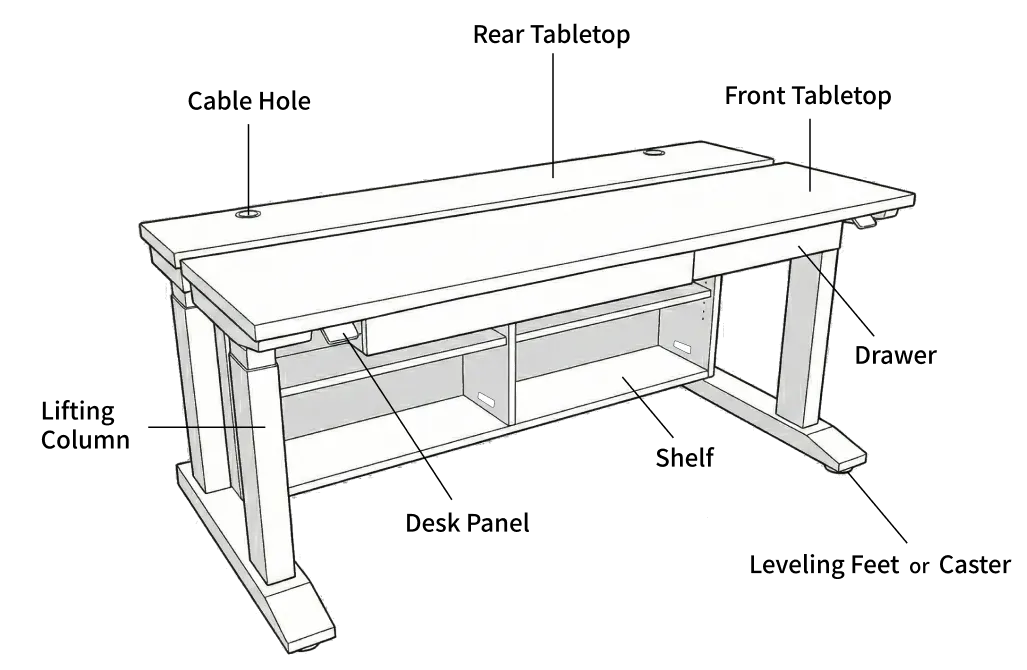
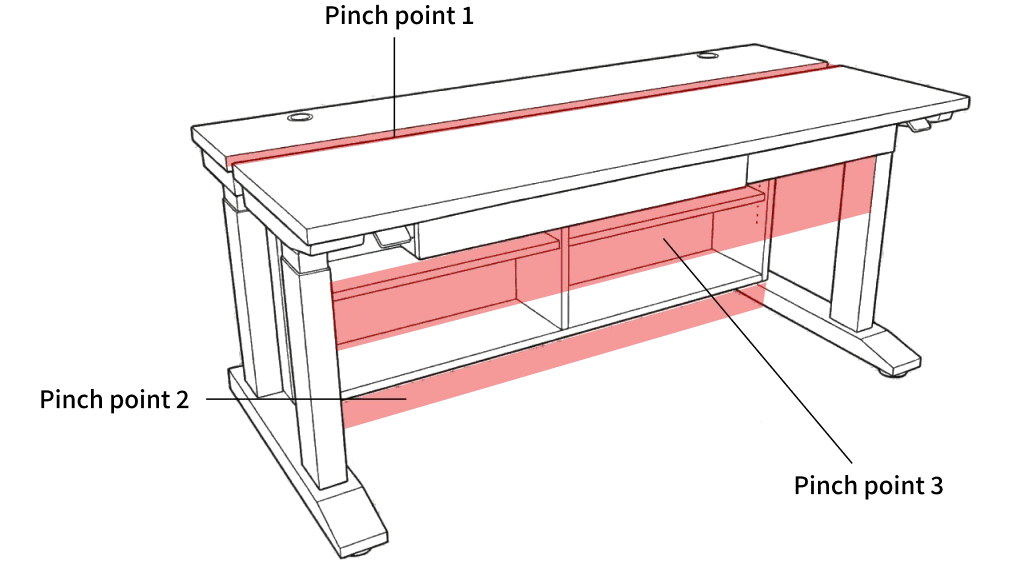
This product has a special structure in which two tabletops are raised and lowered electrically and independently of each other. There are 3 extremely dangerous pinch points where trapping fingers, hands, arms, legs or other body parts can cause serious injury such as broken bones.
Pinch Points
| Area | Location |
|---|---|
| Pinch point 1 | Between the front tabletop and the rear tabletop (gap between the tabletops: approx. 2.5 cm (1 in)). This gap is wide enough for a child’s fingers. |
| Pinch point 2 | Between the underside of the storage shelf and the floor (the rear tabletop and the shelf are one unit and move down together) |
| Pinch point 3 | Between the underside of the front tabletop (including the drawer) and the chair or the user’s legs (when the front tabletop moves down) |
Always Observe the Following
- Never put any part of your body (hands, feet, fingers, head, face, etc.) into the pinch points above while the desk is moving, or immediately before or after moving it.
- Do not crawl under the desk while it is moving.
- Do not stand or sit on the tabletops. Falling over or falling off can result in serious injury.
- Do not move the desk while objects are caught between the tabletops. The objects may break and fragments may be scattered.
DANGER: Precautions Concerning Children
Take particular care in households with small children or pets.
- Never allow children to operate the desk. If a child needs to operate it, make sure the child fully understands the hazards of the product, and always do so under the supervision of a parent or guardian.
- Do not move the desk while children are near it.
- Remind children repeatedly that the desk is a “useful tool”, not a “toy”.
- Parents or guardians must supervise children so that they do not do any of the following dangerous things:
- Crawl under the desk
- Put their hands or fingers between the tabletops
- Climb onto the tabletops
- Play with the desk panel
Required Settings in Households with Children
-
Enable the key lock.
- Enabling the key lock in the Desk Connect app or in the desk panel settings prevents unintended height adjustment.
-
Always set a height limit (lower limit).
- Set a lower limit for the rear tabletop so that a child’s legs cannot get between the storage shelf and the floor.
- Also set a lower limit for the front tabletop to keep enough space between the drawer and the chair.
- You can set the limits in the Desk Connect app or in the desk panel settings.
WARNING: Precautions When Adjusting the Height
- Before moving the desk, make sure there are no people or obstacles around it.
- Stay at the desk while it is moving. If you notice anything unusual, take your hand off the desk panel immediately. The desk stops when you let go.
- If there are drinks on the desk, take great care not to spill them.
- Keep enough free space around the desk (above, below and at the sides). Make sure there is nothing that could obstruct the movement, such as shelves, cabinets or window frames.
- We strongly recommend using the height limit function to set a height range that prevents collisions with obstacles.
WARNING: Collision Detection (PIEZO)
This product is equipped with the LINAK PIEZO collision detection system, which stops and reverses the movement when an obstacle is detected.
However, note the following important limitations:
- Collision detection is only a supplementary safety function. Never rely on this function when using the desk.
- Collision detection may not work in the following cases:
- Contact with soft objects (cushions, clothing, soft parts of the human body, etc.)
- Contact with an object at a very slow speed
- During initialization (reset)
- Immediately after the desk starts moving (approx. 1 second) and immediately before it stops (approx. 1 second)
- When moving down with a light load
- Collision detection does not guarantee personal safety. Always check visually that it is safe before operating the desk.
Especially important: Collision detection does not work immediately after the desk starts moving (approx. 1 second) or immediately before it stops (approx. 1 second). If the tabletop hits an obstacle during these periods, it will not stop automatically. Before pressing the up/down button, always make sure there are no people, pets or obstacles around the tabletops.
Special Precautions During Initialization (Reset)
Collision detection is completely disabled during initialization. When initializing the desk, always observe the following:
- Make sure there are no people, pets or obstacles under or around the desk before you start.
- Do not take your eyes off the desk during initialization.
- For the initialization procedure, refer to the Quick Start Guide or the User Manual.
WARNING: Electrical Precautions
- Connect the power plug to an outlet where it can be unplugged immediately in an emergency. Even if you place a power strip in the cable storage space, always keep the plug in the wall outlet within reach.
- Do not damage the power cord, bend it forcibly or place heavy objects on it. This may cause electric shock or fire.
- If the power cord or plug is damaged, stop using the product immediately.
- Do not touch the power plug with wet hands.
- If you notice an unusual sound or smell from a control box (this product has 2 control boxes, one for the front tabletop and one for the rear tabletop), unplug the power plug immediately, stop using the product and contact Shimizu Zaimokuten.
- This product is for indoor use only. Do not use it outdoors or in humid locations.
- If you hear thunder, unplug the power plug from the outlet.
- Always unplug the power plug from the outlet before moving the product.
Voltage: Before connecting the power for the first time, check that the voltage marking on the control box matches your local power supply.
CAUTION: Precautions for Use
Load
- Distribute the load evenly on the tabletops. An uneven load (weight concentrated on one side of a tabletop) can cause motor wear and malfunctions. It can also affect the sensitivity of the collision detection, which may cause unintended stopping and reversing.
- Do not exceed the maximum load of 80 kg (176 lb) for the front tabletop and 80 kg (176 lb) for the rear tabletop (max. 160 kg (353 lb) for the entire desk).
- Do not use the desk to lift people.
- Do not stand or sit on the desk while it is moving.
Duty Cycle (Limit on Continuous Use)
- The lifting motors of this product have a limit on continuous use. After a maximum of 1 minute of continuous operation, a pause of at least 9 minutes is required (duty cycle 10%).
- Continuous use beyond this limit causes the motors to overheat and can lead to failure.
- In normal use, switching between sitting and standing, this limit is rarely exceeded.
Installation Location
- Install the desk on a flat, stable floor.
- Do not bolt the desk legs to the floor. This can cause malfunctions when the desk moves.
- Installing the desk where it is exposed to direct sunlight for long periods or directly in the airflow of an air conditioner may cause the wood to warp or crack.
- The operating temperature range of this product is 10–40°C (50–104°F) and the operating humidity range is 20–80% (non-condensing).
Cable Routing
- Leave enough slack so that cables are not pulled or pinched when the desk moves.
- Observe the minimum bending radius of 30 mm (1.2 in) for the motor cables. Bending them forcibly will damage the cables.
- Secure the cables properly so that they cannot get caught in the moving parts of the desk.
NOTICE: Unpacking and Assembly
- If the product has any visible damage (cracks, dents, broken parts, etc.), do not install or use it, and contact Shimizu Zaimokuten immediately.
- Assemble the desk yourself by following the included Assembly Instructions exactly, including all safety precautions in them. Do not disassemble or modify the product beyond what the Assembly Instructions describe. Never disassemble or modify the lifting columns, control boxes or desk panels.
NOTICE: Handling the Product
- Do not cover the control boxes with insulating material. Heat cannot dissipate, which can cause failure.
- Do not disassemble the control boxes, the desk panels or the lifting columns. This may cause failure or electric shock. Disassembly voids the warranty.
- Clean the desk panel (DPI1C) with a soft, damp cloth. Do not spray cleaning agents directly onto it. Liquid getting inside can cause failure.
- Do not use strongly acidic or strongly alkaline cleaning agents (outside the pH range 6–8), bleach or chlorine-based cleaners for cleaning.
- Do not use hand sanitizer gel to clean the desk panel.
Summary of Prohibited Actions
The following actions are prohibited. They can cause serious injury or product failure.
| Prohibited actions |
|---|
| Putting any part of your body into a pinch point (between the tabletops, between the shelf and the floor, between the underside of the front tabletop and the chair) while the desk is moving |
| Allowing small children to operate the desk |
| Moving the desk while children or pets are near it |
| Crawling under the desk |
| Standing or sitting on the tabletops |
| Placing loads that exceed the maximum load |
| Using the desk to lift people |
| Continuous use beyond the duty cycle (1 minute of operation / 9 minutes of pause) |
| Using the desk outdoors or in a humid environment |
| Disassembling the product (control boxes, desk panels, lifting columns) |
| Continuing to use a damaged power cord |
| Bolting the desk legs to the floor |
Disclaimer
Shimizu Zaimokuten accepts no liability for accidents, injuries, or damage to the product or other property resulting from failure to observe the prohibitions and precautions in these instructions.
This section does not limit your rights under applicable product liability laws.
If Something Is Wrong
If you notice anything unusual with the product, stop using it immediately and unplug the power plug from the outlet.
Contact: Shimizu Zaimokuten
- Official website: https://shimizuzaimokuten.com/
- Email: [email protected]
The contents of this document are subject to change without notice for product improvement. Please check the official website for the latest version.